Showing posts with label Foundation. Show all posts

Friday, 6 April 2012

Database


A database is an organized collection of data, today typically in digital form. The data are typically organized to model relevant aspects of reality (for example, the availability of rooms in hotels), in a way that supports processes requiring this information (for example, finding a hotel with vacancies).
The term database is correctly applied to the data and their supporting data structures, and not to the database management system (DBMS). The database data collection with DBMS is called a database system.

Well known DBMSs include Oracle, IBM DB2, Microsoft SQL Server, Microsoft Access, PostgreSQL, MySQL, and SQLite. A database is not generally portable across different DBMS, but different DBMSs can inter-operate to some degree by using standards like SQL and ODBC to support together a single application.


So, the concept of database is the collection of table and they have relationship each table. And the function for database is manipulating the data, protecting the data and so on. There are three relationship in database; one to one, one to many, many to many.


this my project, how to create database using microsoft access click.
Share:

Monday, 2 April 2012

Web Information System (WIS)


In this week I just learnt about web information system. WIS is web-based information system, is an information system that uses Internet web technologies to deliver information and services, to users or other information systems/applications. It is a software system whose main purpose is to publish and maintain data by using hypertext-based principles.
A web information system usually consists of one or more web applications, specific functionality-oriented components, together with information components and other non-web components. Web browser is typically used as front-end whereas database as back-end.

AIU Italic 

Example of WIS

Share:

Saturday, 31 March 2012

Web Aplication Explanation


What is web page ?
I learnt this subject on replacement class, my lecturer gave us 3 weeks that our class left behind with other class. Web Page is a document containing text and graphics created with HTML that is part of group of hypertext documents or resources that can be accessed through internet. There are two types of web pages; static web page and dynamics web page.

And what is differences between them ??
Web statics is web that the content we only read the information that webmaster give, and we cannot give the comment or opinion inside those web page. Is mean we cannot interact with one another (reader and webmaster), also this type we called web page 1,0. E.g AIU website (www.aiu.edu.my).
Web dynamics is web that the content we can read and give comment. And we can interact with the owner of the web. We can give the comment if the contents are false or u can give suggestion. We called web page 2,0. E.g blogger.com, wordpress.com and so on.
Share:

IS Develoment Methodology


IS Development Methodology is collection of procedure, techniques, tools, and documentation aids which will help the systems developers in their efforts to implement new IS. If we want to build a new software or an information we must refer to that particular methodology to make analysis and design process more accessible to non-expert. ISD methodologies is recommended of philosophies, phases, procedures, rules, technique for developers of information systems. There are many types of ISD methodologies to build Information Systems :

·         STRADIS
This method is introduced by Chris Gane and Trish Sarson on system analysis and design in the 1970’s. their method based on logical model, using graphical techniques to enable users. Also this method focus on flow diagram which is used to describe process in the system and how to transform data.


·         INFORMATION ENGINEERING
IE is an architectural approach to planning, analyzing, designing, and implementing application within an enterprise.

·         JACKSON SYSTEM DEVELOPMENT
JSD is is a method of system development that covers the software life cycle either directly or, by providing a framework into which more specialized techniques can fit.


·         PROTOTYPING
An easily modified and extensible model (representation, simulation or demonstration) of a planned software system, likely including its interface and input/output functionality.


·         SDLC (System Development Life Cycle)
The oldest and most known methodology used to coordinate the efforts of information systems development is known as the “Waterfall”. The model is based on a set of generic life cycle stages to guide developers from an initiating through maintenance of the completed systems. 

Share:

Saturday, 24 March 2012

Type of IS


1.     TPS (Transaction Processing System).
The transaction processing system records the data from everyday operations throughout every division or department in the organization. Each division or department is tied together through the TPS to provide useful information to management levels throughout the company. It used by Supervisior (lower/operational manager) to monitor operational everyday.


2.     MIS (Management Information System).
MIS is an integrated collection of people, procedures, databases and devices that provides managers and decision makers with information to help achieve organizational goals. The function of MIS is to help an organization achieve its goal by proving manager with information. MIS take the data and make decision to get reports (output) like summary, demand, periodic. It used by middle manager (tactical Decision).


3.     DSS (Decision Support System).
An organized collection of people, procedures, software, databases and devices used to support problem-specific decision making. It is used for complex "what-if" questions that require internal and external data. Decisions at this management level are mostly complex. Same like MIS, DSS systems are used by middle manager (tactical) to solve specific problems in organization.

4.     ESS (Expert Support System).
An Executive Support System (ESS) is software that allows users to transform enterprise data into quickly accessible and executive-level reports, such as those used by billing, accounting and staffing departments. An ESS enhances decision making for executives.
Sharing the same concepts of a DSS, an ESS focuses more in the end-user requirements of maximum interactivity and user-friendlyness. An ESS can be understood as a friendly, fully customised and interactive DSS to be mostly used by top executives and policy-makers to get permanent and updated assessment in relation to key questions (information and knowledge).

While a complete DSS will have efficient links to  external large   databases and advanced  models, an ESS focuses only on interactive and executive assessment tools, those which can be used personally by end-users. An ESS requires a previous expert work filtering information and knowledge into meaningful indicators and tools.


In this topic also we had Assignment about Information System in AIU Library :


Share:

Information System

What is System ?? System is a se of elements or components that working together to achieve a common set of objectives. So, information system is A Set of interrelated elements/components that collect , manipulate , store, disseminate data and information.


The picture above shown that the component of Information System, such us; people, telecommunication, Software, Hardware, Database, and procedure. The component are used to build any kind of services; e.g PayrollSytem, customer services, Inventory System, Marketing System.
·         People.
People who manage, run, program, maintain the system work properly. People also the important thing that Information System must be included.

  • ·         Telecommunication.

Telecommunication is electronic transmission of signal for communication which is enable organizations to carry out their process and task throught effective computer; for example Information System need Internet connection.

  • ·         Software.

Consist of computer programme that govern the operation of the computer. E.g finance software (process payroll, send bills to customers, provides manager with Information System)

  • ·         Hardware.

Consist of equipment used to perform input, processing and output activities.

  1. ·         Database.

Database used for organizing collection of facts and information, typically consisting of two or more related data files.

  • ·         Procedure.

Procedure is strategies, policies, methoes and rules for using computer information System including operation, security and maintenance of the computer.


Share:

Thursday, 22 March 2012

ICT in Daily Life


In 21st Century, ICT make influence in our society. Such us our healthy, business, government, education, and science. In this lesson, we had presentation assignment about ICT in our daily society. We divided by 5 group and each group, my group were yusuf from Singapore, firdaus from Malaysia, Zulkarnain from Indonesia and Adnan from Kosova; our topic was ICT application in government. We have chosen Singapore because in Singapore the government success leading the country and use ICT in their system.
Our Group Presentation

There are several application that Singapore use :
·        Housing.
This application for count people that people live in Singapore. Its make government easier to count, because they use this application. And also make singaporian easier to find new house consider with safety and cheaper.

·        Health.
In health application, the Singaporian can access information about health online. Also the government will post the article about health, new viruses, how to avoid the disease and so on. This application is helpful.

·        E-Government.
E-Government consist of portal web, online news, security (streaming CCTV), national service. Government make this application to catch people to get information from any media; handphone and computer devices.
Also in this portal government can introduce tourist area, hotel, transportation, employment

·        Smart Card Alliance.
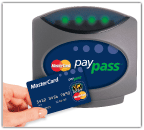
Smart Card Alliance is the company that provide electric payment. We don’t need to bring more money, but our money is inside the card. And we just scrabe the card into the machine. It usually use for train, bus and any kind of payment.
Smart Card

Our Presentation
Kamoliddin's Group

Share:

Sunday, 18 March 2012

Information Technology


Information Technologi (IT) is Any computer-based tool that people used to work with information and to support the information and information-processing needs of an organisation. And IT can be divided into 2:

  • Information Technology Architecture
A comprehensive view of an IT Architecture specifies policies and principles that indicate direction, and services and common solutions, standards and guidelines, and products that detail the means of implementation.
The framework for the IT Architecture is that of a cube sliced into five sections or layers from back to front. Each section or layer represents a type of architectural specification from the most general IT policy layer at the back of the cube to the most specific product layer at the front of the cube.


  1. ·        Information Technology Infrastructure


While IT Strategy determines what your information technology must accomplish in order to achieve your business objectives, it is the IT infrastructure that has the supporting role; because its capacity, reliability, and level of vulnerability directly impact your ability to implement successfully and ultimately reach objectives.
IT infrastructure and its ability to meet the needs of their businesses. We do not sell hardware or software. We assess what’s available based on your needs, priorities, and budgets; and then we make recommendations according to what our experience suggests is the best fit for your organization. Although we do work with and will refer reputable vendors, we are never involved in that revenue stream ensuring that our sole intent is finding the best possible solution for you.
When it comes to infrastructure, we can help you identify the right combination of components for your business based on a range of criteria including; budget, scale, capacity, availability, level of security, IT operational procedures, redundancy requirements, staff competency, partners involved, etc. Our analysis will typically include higher and lower end alternatives to provide a range of options for your consideration so that you can be sure of selecting the best possible cost/benefit combination.


Share:

Wednesday, 22 February 2012

Data and Information


This week was the first week that I had learnt. Because almost 2 weeks our class was postpone and I thought I would have a busy job to do for this. Its mean I will have replacement class, combine of subject each week. That things can make my brain think harder to catch the subject.
This course about data and information. Do you know what is data and what is information ??. Most people say data and information are same meaning, but actually these are different even some of them are same. Data is uprocessing alphabet and number (entries) that make reader cant to understanding and concluding. Information is processing alphabet and number (entries) that arrange exactly true and make receiver can read and understand about the information is written (structure).


In today’s economic IT (Information Technology) has a big effect changing the economic and business practices. The problem was very complicated, for example 3000 people in queue to pay credit card. Each person need 4 minutes to completed. But now, we can pay from internet by i-banking (online), we just stay in our room using computer or handphone. We have a more time to do our job without thinking about queue. Also Poor quality of information, including lack of consistency, duplication, and out-of-date information.


Share:

Monday, 19 December 2011

Week 9: Internet


In this week I learned about Internet. It was really interesting for me. My favorite part was networking.. I didn’t know about Internet and Networking detailed before. I knew the history of Internet, the timeline of Internet and able to predict the next growth of the Internet, some basic applications or uses of Internet. So I could learn further more from this. And then our lecturer taught the technologies lie behind accessing the Internet, the “language” of the Internet and relate it to other form of communication systems and various ISP throughout the world. I knew how to access the Internet, Internet Connection, Internet Service Provider (ISP), how to create a new dial-up connection, how to modify an existing dial-up connection and IP addressing. After that our lecturer explained about safety issues pertaining to the access and use of the Internet and  other possible issues that could rose with the development of Internet applications and the rapid growth of the Internet it self. I studied ICT before in Indonesia, I like studying ICT. I hope I could improve my IT skills. Also my lecturer gave me a project Internet tools or Internet application. And I’ve choosen Internet tools, it was a proxy software.


this is my video, Internet Tools :
Share:

Sunday, 18 December 2011

Week 8: Ms Excel and Power Point


This week I learnt about how to use Microsoft Excel and Power Point. For Microsoft Excel, first class Mr. Amirul taught us about how to calculate pivot. Pivot was a feature of Microsoft excel to manipulate the data. You can change the data without change the data that was pivot. After that my teacher miss. Nissa gave me an exercise for excel.
Insert Diagram

Share:

Week 7: Microsoft Word Basic


Session 2 of week 7 was on Thursday, 10th November 2011. It was at 15.00 pm – 17.00 pm. We did not have session one because session one was on our holiday. Our holiday itself was from 29 October 2011 until 8 November 2011.
In this session, we learnt about Ms. Word Basic. It was about how to use Microsoft Word. At this time, we also were asked to create a sample of a template in Ms. Word, create a link in Microsoft Word, and create some sentences using several facilities in Ms. Word. At the end, we discussed about our Project Proposal. For our group, we were consisted of four people. However, we were three at the moment because we missed one member who moved to another class. From this session, I got many new things. I realized that Ms. Word 2010 was more improved than Ms. Word 2007. Those improvements made us easier to use Ms. Word.

Share:

Week 6: Anatomy of MS Windows OS

In this week, I learnt about Microsoft Windows Operating System such as Windows­­­xx, NT, Server, me, 2000, Xp, Vista, till windows 7. Microsoft created the operating system in the mid-1980s. They have a version of OS that is designed for home user till bussines. Windows is not open source software, we should pay for the code. But now, a lot of loader “cracker” for windows, we shouldn’t pay (free) but its set the law at defiance, if someone do they will put it you in the prisioner or should pay more.

In this week, my teacher only taught us about Windows 7 because it was the lastest windows operating system. Windows 7 has many changes are:

·         Decrease start up and shutdown = 20 seconds
·         Sleep and resume faster
·         Use less memory
·         Wifi connect quickly
·         Detecting USB faster

And it was different with windows Vista. Windows Vista almost opposite overall with windows 7. GUI of windows 7 and vista was same because they integrate with aero but not for Xp. This is a new features in windows 7 are aero view, taskbar, search, libraries, gadgets. Also windows 7 has additional tools. Are device stage, windows live essential, homegroup, windows touch, remote media streaming. In windows 7, you could find your file easier use search.

In this week, my teacher was choosen abdiaziz, wai wai ko, and me for shared about windows operating system. for my topic is about windows Xp. Windows Xp was great Operating System before Vista and 7. It stable in any hardware requirement but the system was weak.
Share:

week 5: About Network

   In this week, my lecture taught me about basic networking concepts. I am the one for first time who get this kind of course material. First I did not understand what is it about but after she explained more about it and also there was debate session about wired and wireless, I understand what is it about. In this week, we just focus learn about the differences between LAN, MAN and WAN. From these lessons, I have got to know about the definition about it, the area which can be connected with these types of computer network and the uses of them. I have just known that AIU and my cell phone use Metropolitan Area Network, for office network school they use Local Area Network and for Wide Area Network, it uses a combination of satellites fiber optic and microwave.
LAN


MAN 

WAN 
Share:

Week 4: Introduction Of Library


i thought this week i didnt have class in ICT because in this week i had explain about Library. mr hasbullah taught us how to use library as online. and how to borrow, check books. he gave us a pen for gift expeciall G1, hassan and adnan got note books from mr hasbullah because they answered questions from mr hasbullah

Share:

Week 3: Software Layers


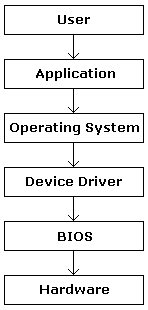
Week three was in the first week of October 2011. It was on Tuesday, 4 October 2011. We leant about Software Layers: Operating System, Drivers, System Software, and Application Program. At this chance, we needed to remember about Software Layers. It was written that in Software Layers:
Computer User à  Application à Operating System à Device Drivers à System Software (Bios) à Computer Hardware

            Wow, it was difficult for me to remember that software layers, we must remember because it will be out in the final exam. And for Operating System function I learnt in this week. Now, I knew the types of Operating System e.g :
o   Stand Alone – DOS, Windows, Mac, Unix, Linux
o   Server – windows Nt, Unix, Linux, Solaris
o   Embedded OS – Windows CE, Palm OS, BB, Android

And for Programming Language (PL) there were 2 types (Low-level and High-level). Low level used computer language / number of binary. And for High-level used machine independent. There were 3 generation of HLL (higher-level Languange) : third, fourth, fifth-generation language. I was like: C++, Pascal, Java, VB. But my teacher said you would study this programming language next semester or you can join in ICT majoring.

Share:

Week 2: Computer Hardware Basic

In this week I learnt about computer hardware basic. My teacher introduced us about this hardware. Started from the history of computer, computer architecture, Processing and power of computers. And she explained about computer architecture, how to process the data in the processor. This computer architecture was confusing for me because the data went in and went out in CPU (Program Logic) before it appeared in monitor. 

Also I learnt about the categories of computers. There were :
o   Embedded computers
o   Mobile computers
o   Personal computers
o   Midrange servers
o   Mainframes
o   Supercomputers

After learnt about computer categories, she tought us about system unit components were:
o   Processor
o   Memory module
o   Sound card
o   Modem and video card
o   NIC
o   Port and connectors
Share:

Week 1 : Introduction About Computers


In this session, we introduced ourselves. We gave some info about ourselves. It was just an ice breaking. Our lecturer just wanted to know our names and our countries. After that, we talked about what we knew about Information, Communication, and Technology. Some of us told about definition of IT. Some others mentioned about internet and so on. The last, we had to create a blog for our study. This blog will be a media for us to share the knowledge about what we had learnt in the class. We also should submit our report about what were happening for previous classes. It was like a diary. We should report it weekly. Overall, this session was about some information regarding our course.
By the way, I tried to create this blog on this day. We were given some time to create our blog. For those who already had a blog, were advised to create a new one because this blog would be about our course. Luckily, I could finish creating this blog after the class. For the lecturer, I like his lecturing style. We students involved in his lecturing, because he often asked us some question based on our topic. We also could share our knowledge about computer and technology or even only gave some comments about computer.
At this time, we learnt about various things, such as: introduction the names of the software, hardware, some jargons in computer, and number systems. For the software and hardware, we did not spend much time. It was just to know the name of those things. For number system, we spent a plenty of time, because we needed to know these number systems.
Any way, I brought my computer book from Indonesia. I had learnt a little about computer when I was at high school. It helped me so much. I opened that book when Mr. Azhar explained the Introduction to Computers and Internet course. After opening that book, I re-opened my knowledge about binary number at that time. It was very nice to learn computer. Even, computer was my favourite subject when I was at high school.
For me, I got some problem with numbers. I got confused how to convert from one number system to another number system. Even, when I tried to answer the question on the book, I only got one answer out of 3 questions. Then, for jargon/term about computer, I also got a little confused. However, I knew that point later on. First, I guest that jargon meant something related to internet. After that, I realized that jargon meant that some special words which was used for computer, such as: mouse, keyboard, etc. It was very simple.

Share: