Wednesday, 18 February 2015

Beautiful Creatures: Bees


One day in the afternoon, I'd watched TV program which showed one of the most beautiful creatures in the world, Bees. Why is it beautiful? There are so many benefit from it, starting from the larva until its honey itself. Additionally, its behavior on how to build their house (honeycomb), to serve their queen, and make mutual-ism symbioses between one another very unique to be discussed too.

Bees are flying insect closely related to ants and wasps, and are known for their role in pollination and for producing honey and beeswax (Wikipedia). Approximately 20k known species of bees in seven to nine recognized families. They live in every places where flowering-plants are available, except in Antarctica continent. They eat on nectar and pollen, primarily as an energy source that consist of protein and other nutrients. Mostly, pollen is used as food for baby bees (larvae). 


Here is the unique from bees! Bees consist of several caste that work according to the caste. They work exactly the same like ants and humans usually do, there is system inside the colony so they can complete the job awesomely without any jealousy one another. I can imagine how human work like that every day, our live will be very peaceful. 


Workers’s job is to find the nectar and pollen on flowering plants. This time, bees are doing multitask work. First, it does take the nectar and pollen for larvae in honeycomb and secondly it spreads the nectar in their feet to other flowers to make another “cross bred” (pollinating). That help flower to get natural insemination for making “fruits”. 'Workers' also make the honeycomb from fibrous part of wood + its enzyme, then going back to their nest to make it bigger by putting the fibrous + enzyme. It’s one of the action to serve their queen. LONG LIVE MY QUEEN! :)

I mentioned above that 'workers' only find and take the nectar + pollen. They can’t produce their own food. Then who are the chef of this emperor?? It’s LARVAE! Anyway, don’t judge the things by its size. Even though larvae is very small known as baby bees but larvae is the chef (they are good cooker). After larvae cook their food, they serve to the worker and queen. The good thing, it doesn’t waste their food like human. It saves some food in another bunker that 'workers' already made, it’s called HONEY. So, no more food wasted.

For your information

  • The temperature to make honeycomb is nearly fifty degrees Celsius (500 C), that’s why bees are using their wings to reduce temperature little bit down. 
  • Honey consist of ton of nutrients that human need in their live and to heal any illness. 
  •  Mostly bees are diurnal, active in the daylight. But there are four bees’ families (Andrenidae, Colletidae, Halictidae, and Apidae) that are nocturnal, active in the night. (Wikipedia).
  • Bees are humble and justice. They won’t attack you, if you don't disturb. If you attack them, they are willing to use their stings to entrust their live to defend their emperor. Once they sting, they will die.
  • Then why honeycomb has hexagonal shape? Because as I know, hexagonal is the best shape to preserve honey and not wasting place, meaning that its fit. 
  • Bees only attack your head ! WHY?? because bee detects carbon dioxide in our respiration system. So, when bees attack you, directly cover your head first and reduce your breathing.
Lastly, I’ve read quote from scholars but I forgot the name, maybe Imam Syafiie. 

“Live like a bee because they eat well, do well and produce good things”.

Eat well here is nectar and pollen from flowers, do well is pollinating to other flowers and lastly, produce good things are honey and bee pollen as medicine for human. Hey human, will you do the same??? Ask yourself!!

Share:

Sunday, 11 January 2015

Clinic Reservation in Java

This is one of the final project in our java programming class. Lecturer gave us task to complete the program with certain function to record patient details using simple array. Maybe this program is not 100% perfect, because maybe my logarithm skills is not good enough. I couldn't find the solution to delete element and if the element is empty shouldn't show. Anyway here is my code.

Here the output will be in console.

So, I will upload different method to explain every function of the method code.


This code above is the class on this program. All method and main method will be inside this bracket. What is class? I can assume that class is like motorbike, in motorbike has different name/brand. The object that has created from class will inherit the behavior from the class.


//Declare and assign the final value so that wont get change by another method
    public static final String[] name = new String[3];
    public static final int[] ic = new int[3];
    public static final String[] phone = new String[3];
    public static int i = 0;
    public static int sum = 0;

this code above is declaration of variable that has base value that can be accessed from all method inside the class. That's why, I declare outside from main method but inside the class. If state "final", it means that the value of the variable can be changed from any method function. So, the result will be final !


public static void main(String[] args) {

        int x, index,id;

       Scanner in = new Scanner(System.in);
        do {
        System.out.print("\n\nWelcome to the Automated Reservation Machine!\n");
        System.out.println("Select from the following menu options below:\n");
        System.out.println("========================");
        System.out.println("| [1]  Add Patient   |");
        System.out.println("| [2]  Print         |");
        System.out.println("| [3]  Search        |"); 
        System.out.println("| [4]  Edit          |");
        System.out.println("| [5]  Sum / Average |");
        System.out.println("========================");
        System.out.print("Please select your option now: ");
        x = in.nextInt();
            
            if (x==1){
               addPatient();           
            }
            
            else if (x==2){
                printPatient();  
            }
            
            else if (x==3){   
                System.out.print("Search patient by Id: ");
                id = in.nextInt();
                System.out.println("-----------------");
                index = getIndex(id);
                searchPatient(index);
            } 
            
            else if(x==4){
                System.out.println("Edit refers to Id!");
                System.out.print("Please enter Id: ");
                id = in.nextInt();
                System.out.println("-----------------");
                index = getIndex(id);
                searchPatient(index);
                if (index!=-1){
                    editData(index);
                }
            }
            
            else if(x==5){
                int r=0;
                if(name[r]==null){
                    System.out.println("Today we have no patient ");
                }
                else {   
                System.out.println("Average per day is RM "+averagePatient(sum));}
                System.out.println("Sum = RM "+sum);
            }
            
            else
                System.out.println("Please choose the option correctly");
        }while(x!=0);
}//end main method

The code above is the main method. Main method is the brain of the program. All method will work from calling the main method. It is called call method. If we have main method but we cannot utilize the main method, the other method will not work. So, main method has the important role.


public static void addPatient(){
        
       Scanner input = new Scanner(System.in);
       
            if(name[name.length-1]!=null){
                System.out.println("SORRY DATA IS FULL !!!"); //it will appear when data is full
            }
            else {
                System.out.print("\nPlease enter the name: ");
                name[i]  = input.nextLine();
                System.out.print("Please enter the phone number: ");
                phone[i] = input.nextLine();
                System.out.print("Please enter the Id: ");
                ic[i] = input.nextInt();
                sum+=5;
                i++;
            }
    }//end addPatient method

public static void editData(int z){
        Scanner in = new Scanner(System.in);
        System.out.print("Please enter new name: ");
        name[z]=in.nextLine();
        System.out.print("Please enter new phone: ");
        phone[z]=in.nextLine();
        System.out.print("Please enter new Ic: ");
        ic[z]=in.nextInt();
        
    }//end editData method

The method above is to edit data inside the array. We can change the element of the array if we know the index of the array that we would like to change. How to get index of the array? we can use method getIndex().

The method above is how to print all the patient for each array. If the index of array name is null/empty, it will return "Sorry No Data Available", else it will print all the element.


public static int getIndex(int a){
        
        for (int d = 0; d < ic.length; d++)
      {
           if (ic[d] == a ) 
                 return d;  //We found it!!!
      }
        return -1;
    }//end getIndex method

As I told you above that we need getIndex method to know which index that we need to print, search and edit. We call that method then if the data is found, getIndex method will return the index to the calling method, and if not found it will return -1.

public static void searchPatient(int a){ 
        
        if(a==-1){ //Condition when return value from index not found -1
            System.out.println("\nThe  customer information is not found!!!");
            System.out.println("__________________________________");
        }
        else
        System.out.println(a+1+"\t\t"+name[a]+"\t\t"+phone[a]+"\t\t"+ic[a]);
    }//end searchPatient method

Search method is needed if we want to find data based on the id of the person. It also takes getIndex method to find the data. If not found it will return -1, and say "Customer information is not found", else it will print the exact information.

Lastly, I will upload all the codes in one class.

package patientreservation;

import java.util.Scanner;

public class PatientReservation {
    
    //Declare and assign the final value so that wont get change by another method
    public static final String[] name = new String[3];
    public static final String[] ic = new String[3];
    public static final String[] phone = new String[3];
    public static int i = 0;
    public static int sum = 0;

    public static void main(String[] args) {

        int x, index,id;

        Scanner in = new Scanner(System.in);
        do {
        System.out.print("\n\nWelcome to the Automated Reservation Machine!\n");
        System.out.println("Select from the following menu options below:\n");
        System.out.println("========================");
        System.out.println("| [1]  Add Patient   |");
        System.out.println("| [2]  Print Patient |");
        System.out.println("| [3]  Search Patient|"); 
        System.out.println("| [4]  Edit Patient  |");
        System.out.println("| [5]  Sum / Average |");
        System.out.println("| [6]  Delete        |");
        System.out.println("========================");
        System.out.print("Please select your option now: ");
        x = in.nextInt();
            
            if (x==1){
                addPatient();           
            }
            
            else if (x==2){
                printPatient();  
            }
            
            else if (x==3){   
                System.out.print("Search patient by Id: ");
                id = in.nextInt();
                System.out.println("-----------------");
                index = getIndex(id);
                searchPatient(index);
            } 
            
            else if(x==4){
                System.out.println("Edit refers to Id!");
                System.out.print("Please enter Id: ");
                id = in.nextInt();
                System.out.println("-----------------");
                index = getIndex(id);
                searchPatient(index);
                if (index!=-1){
                    editData(index);
                }
            }
            
            else if(x==5){
                int r=0;
                if(name[r]==null){
                    System.out.println("Today we have no patient :)");
                }
                else {   
                System.out.println("Average per day is RM "+averagePatient(sum));}
                System.out.println("Sum = RM "+sum);
            }
           
            else if(x==6){
                if(name[0]==null)
                {
                    System.out.println("Sorry no data available");
                }
                else {
                    System.out.print("Search patient by Id: ");
                    id = in.nextInt();
                    System.out.println("-----------------");
                    index = getIndex(id);
                    searchPatient(index);
                    
                        if(index!=-1){
                       deletePatient(index);   
                    }
                    
                }
            }
            else
                System.out.println("Please choose the option correctly");
        }while(x!=0);
}//end main method      
    
    public static void deletePatient(int a){
          name[a]="-";
          phone[a]="-";
          ic[a]="-";
          i--;
    }
    
    public static void addPatient(){
        
       Scanner input = new Scanner(System.in);
       
            if(name[name.length-1]=="-"){
                System.out.print("\nPlease enter the name: ");
                name[i]  = input.nextLine();
                System.out.print("Please enter the phone number: ");
                phone[i] = input.nextLine();
                System.out.print("Please enter the Id: ");
                ic[i] = input.nextLine();
            }
            else if(name[name.length-1]!=null){
                  System.out.println("SORRY DATA IS FULL !!!"); //it will appear when data is full
            }
            
            else {
                System.out.print("\nPlease enter the name: ");
                name[i]  = input.nextLine();
                System.out.print("Please enter the phone number: ");
                phone[i] = input.nextLine();
                System.out.print("Please enter the Id: ");
                ic[i] = input.nextLine();
                 
            }
            sum+=5;
            i++; 
    }//end addPatient method
    
    public static void printPatient(){
        
        System.out.println("______________________________________________________________");
        System.out.println("No.\t\tName\t\tPhone Number\t\tIC");
        System.out.println("--------------------------------------------------------------");
        
        int a=0;
        if(name[a]==null){
            System.out.println("SORRY NO DATA AVAILABLE !!!"); //when data is not available
        }
        else
           
            for(int j=0;j<ic.length;j++){
                
                if((name[j]==null)&&(phone[j]==null)&&(ic[j]==null))
                {
                    name[j]="-";
                    phone[j]="-";
                    ic[j]="-";
                }
                System.out.println(j+1+"\t\t"+name[j]+"\t\t"+phone[j]+"\t\t\t"+ic[j]);
            }
    }//end PrintPatient method
    
    public static double averagePatient(int d){
        
        return d/i;
        
    }//end averagePatient method

    public static void editData(int z){
        Scanner in = new Scanner(System.in);
        System.out.print("Please enter new name: ");
        name[z]=in.nextLine();
        System.out.print("Please enter new phone: ");
        phone[z]=in.nextLine();
        System.out.print("Please enter new Ic: ");
        ic[z]=in.nextLine();
        
    }//end editData method
    
    public static int getIndex(int a){
        
        String s;
        s = Integer.toString(a);
        
        for (int i = 0; i < ic.length; i++)
      {
           if (ic[i].equals(s) ) 
                 return i;  //We found it!!!
      }
        return -1;
    }//end getIndex method
    
    public static void searchPatient(int a){ 
        
        if(a==-1){ //Condition when return value from index not found -1
            System.out.println("\nThe  customer information is not found!!!");
            System.out.println("__________________________________");
        }
        else
        System.out.println(a+1+"\t\t"+name[a]+"\t\t"+phone[a]+"\t\t"+ic[a]);
    }//end searchPatient method
}//endclass

Share:

Sunday, 4 January 2015

Season Calculator in Java

For those of you where your place don't have four seasons like europe and any other countries have, don't be sad to determine which date of month is the season would be. I'd received this assignment from my lecturer to determine the season according to the date and month.

package calender;
import java.util.*;
public class Calender {

    public static void main(String[] args) {
        int date, month; //declare the variable
        
        //declare the Scanner so that user can store value to memory
        Scanner input = new Scanner(System.in);
        
        //Asking user to enter the date
        System.out.print("Please enter date: ");
        date = input.nextInt();
        
        //Asking user to enter month
        System.out.print("Please enter month: ");
        month = input.nextInt();
        
        //Condition to determine month not more than 13 and day not more than 32
        if (month >= 13 || month < 1 || date > 31 || date <= 0) {
            System.out.println("Please enter a valid date and month");
        } else {
            System.out.print("On "+getMonth(month)+", "+date+" the season ");
            System.out.println("is: "+season(date,month));
            
        }
    }//end main method
    
    public static String getMonth(int z) //Task3 Addition
    {
       //Switching number to string type
        switch(z)
        {
            case 1: 
               return "January";
               
            case 2:
                return "February";
                
            case 3: 
               return "March";
               
            case 4:
                return "April";
                
            case 5: 
               return "May";
               
            case 6:
                return "June";
                
            case 7: 
               return "July";
               
            case 8:
                return "August";
                
            case 9: 
               return "September";
               
            case 10:
                return "October";
                
            case 11: 
               return "November";
               
            case 12:
                return "December";
                
            default:
                return "No Month";
        }
    }//end getMonth method
    
    public static String season(int x, int y) //task2
    {
        String season = null; //Initializing season before statement
      
        //The condition when the season start
        if (((y == 12)&&(x>=16))||((y<=3)&&(x<=15))){
            season = "Winter";
        }          
        else if (((y >= 3)&&(x>=16))||((y<=6)&&(x<=15))){
            season = "Spring";
        }
        else if (((y >= 6)&&(x>=16))||((y<=9)&&(x<=15))){
            season = "Summer";
        } 
        else if (((y >= 9)&&(x>=16))||((y<=12)&&(x<=15))){
            season = "Fall";
        }
        return season;
    }   //end season method
}//end class

Share:

Sort First-digit of Integer Number

Maybe some of you know how to get first digit of number. For example this question: "how to get '2' from this number "2378940048"? Literally in logic, we can do this question by dividing this number with 10 and it will remain 237894004.8 (in decimal) and  we will get 237894004 (in integer), without 8 because integer does not recognize fraction /floating value. It's easy, isn't it?. Then, here it is!


  • Using Method First-digit

package firstletter;
import java.util.*;
public class FirstLetter {

    public static void main(String[] args) {
        int a; //declare the variable
        
        Scanner input = new Scanner(System.in);
        
        //Input from the user
        System.out.print("Please enter your number: ");
        a = input.nextInt();
        
        System.out.println("So the first digit of this '" +a+"' is: "+firstDigit(a));
    }//end main method
    
    public static int firstDigit(int n)
    {
        //Condition to determine the value 
       while (n < -9 || 9 < n) 
           n /= 10;
       return Math.abs(n); //Math absolute is used to round the value
    }//end First digit method
}


  • Using Single Method in main
package firstletter;
import java.util.*;
public class FirstLetter {

    public static void main(String[] args) {
        int a; //declare the variable
        
        Scanner input = new Scanner(System.in);
        
        //Input from the user
        System.out.print("Please enter your number: ");
        a = input.nextInt();
        
//Condition to determine the value 
       while (a < -9 || 9 < a ) {
           a /= 10;
}
        System.out.println("So the first digit of this '" +a +"' is: "+a);
   
}//end main method
Share:

Sort Odd and Even Number in Java

In this section, I post about java programming language. In previous campus I learnt C# language, then I moved to another campus, definitely, I have to change my language because different course syllabus. C'est rien pour moi! new campus = new life = new language = new destination. Voila, c'est la vie! must go on!

I've written the java code when lecturer gave us the assignment about how to sort odd and even number. Here, I'll show you how to solve direct sort and using array that can store certain number of data.


  • Use Array


package arraylist;

import java.util.*;
public class Arraylist{
    public static int[] array = new int[0]; //Creating and object array
    
    //Creating list integer array even and odd
    public static List even = new ArrayList<>();
    public static List odd = new ArrayList<>();

    public static void classify(){
        
        //Deciding method either the value is odd or even
        for(int i = 0 ; i < array.length ; i++){
            if(array[i] % 2 == 0)
                even.add(array[i]);
            else
                odd.add(array[i]);
        }
    }//end classify method

    public static void display(List list){
        
        //Display the value inside the list integer
        for(Integer i : list)
            System.out.print(i+" ");
    }

    public static void main(String[] args){
        //Declaring variable and creating scanner
        int num,count=1;
        Scanner in = new Scanner(System.in);
        
        //Asking user how many number to input
        System.out.print("how many input? ");
        count = in.nextInt();
        array = new int[count]; //Assigning the total of index in array
       
           for(int i = 0 ; i < array.length ; i++)
           {
            System.out.print("number would like to enter ");
            num = in.nextInt();
            array[i]=num; //Assigning to the array according to the index
            }
    
        classify(); //Call method to classify
        
        System.out.print("Even number is ");
        display(even); //Call method to display even
        System.out.print("\nOdd number is ");
        display(odd); //Call method to display odd
        System.out.print("\n");
    }
}//end Class


  • Use Direct method
/*
 * To change this license header, choose License Headers in Project Properties.
 * To change this template file, choose Tools | Templates
 * and open the template in the editor.
 */

package oddevennumber;

import java.util.Scanner;

public class OddEvenNumber {
    public static void main(String[] args)throws Exception {
        
        int num = 0;

        Scanner input = new Scanner(System.in);

        while(num!=-1)
        {
            System.out.println("\n###############################");
            System.out.println("Press '-1' to exit this Even/Odd checker");
            System.out.println("###############################");
            System.out.print("number would like to enter :");
            num = input.nextInt();
            AllDigitsOod(num);
        }
        System.out.println("Thanks!");
    }
    
    public static int AllDigitsOod(int x)
    {
        boolean a=(x%2==0);
        if (a ==true)
            {
                 System.out.println(x+" is even\n");
            }          
        else if(x==-1)
        {
            System.out.println(" You exit from this game");
                }
            else 
            {
                System.out.println(x+" is odd\n");
            }
        
        return  x;
    }
}
Share:

Wednesday, 23 July 2014

Why did Hitler kill Jews?

Hitler's propaganda

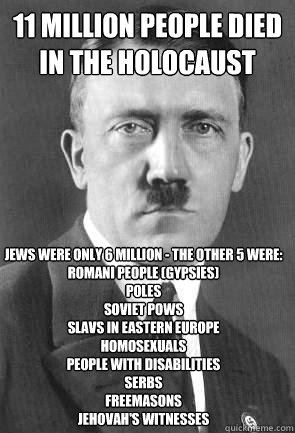
Maybe all of you support Hitler when he killed millions Jews in Germany when he was a leader of Nazi. He also said, “I will left some of Jews and you will know why I killed them!” But did you know the reason why he killed all of them?


Mein Kampf book

Obviously, Hitler/Nazi was not only Anti-Jews but also he against all races in the world which was not originally race from Germany (Aryan Race). You can read book “Mein Kampf series 2” (because series 1 explained his personal life). In that book, Hitler/fuhrer said “Only Aryan race can live in this world because genetically Aryan Race is the top race in the evolution”. The other races except Aryan race must be destroyed because it can ruined the sacred of Aryan race and spoiled civilization. So, if Hitler became leader now, all races will be killed by Hitler and clearly you also will be killed too because you are not from Aryan race. SO THINK ABOUT IT!


https://answers.yahoo.com/question/index?qid=1006042526836

Another opinion:

Hitler's statistic of genocide 


Special for Asians, Hitler called Asians as low-race, maybe as slave. His quote made the first Indonesian President, Ir. Soekarno, became angry. Soekarno wrote an article “Genghis Khan, The Asian Imperialists – Genghis Khan Maha Imperialis Asia” which published in daily newspaper Koran Pembangunan and written in his book “Under Revolution Flag – Di Bawah Bendera Revolusi” in 1960s. He wrote that article to mock Hitler and compared him with Genghis Khan from Asia which he said before as low-race. Hitler insulted Asian as low-race but he, actually, copied the tactics from Genghis Khan who’s from Asia.
Genghis Khan


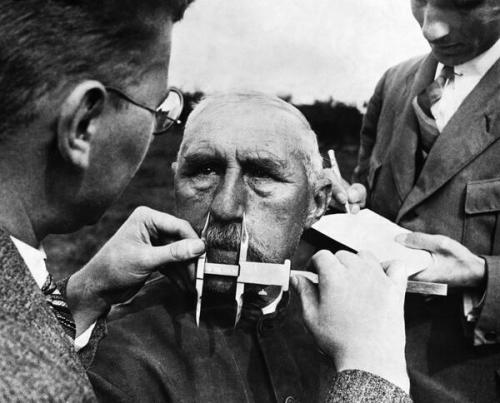
The measurement of Aryan race


In the other hand, German who did not fulfil the standard of Aryan race was killed too. People who were deaf, dumb, blind, and any disabilities also was killed because they were useless person that was written in Mein Kampf. 


So what is the point of this opinion?

Of course, I am totally not supporting Jews. I am moslem and totally against Zionist. Even if you are not moslem, you just need to be human to see what happened in Palestine. My point is that Nazi was Genocide Party and the cruelest racialist party in Germany, even maybe worse than Zionist Israel. So why did you put Hitler was better than Israel? Because he did genocide to Jews? No!! To me Nazi/Hitler and Zionist Israel are EQUAL!! They are not human!. So, don't misunderstand about the history if you didn't know the background. Correct Me If Im Wrong. 

JRef: http://www.kaskus.co.id/thread/53c121e19252331a1c8b457e/berhenti-gan-mengagungkan-hitler-nazi-hanya-karena-benci-yahudi

Share:

Tuesday, 15 July 2014

Conky in BlankOn Linux 9 Suroboyo

I use BlankOn Linux distribution, I'd like to appreciate what my community invent and develop open source project. This project is from Indonesia, we should proud being Indonesian. Anyway, user has many options to use Linux but I prefer to use this distribution because it is complete and fulfill what I need. For instance, GIMP, Inkscape, VLC, geo.Blankon Map, etc are built in. The other distributions such us Ubuntu, Mint, Debian, Fedora etc; I think those distributions are complicated for beginner and also the system is heavy. You need to struggle with the internet to update your system after installing. I used to use those distributions which belong to "western community" but I didn't feel satisfied what I used. The problem with this new release (BlankOn 9 Suroboyo) is that user can't manage the disk when installing BlankOn, you need to arrange your partition with gparted or any other partition maker. And also with package repository, because the server in Indonesia and now I'm in Malaysia, my problem is only when I update my system, it's little bit slow. We are still on going to solve this problem by sending the 'ticket' to developer .And I encourage you guys to try this distribution and you will see the difference !! Keep in Open and Freedom!

Conky

Last time, I had problem with conky in BlankOn Linux 9. I wanted to see the system works in my BlankOn and I wonder whether I could use it or not. I've tried so many times to find and to search the solution about Conky. Suddenly, I could realize that it's very easy. What we need to have is only two: conky and conky manager. Done ! :D hehe. BlankOn 9 do not provide you startup application like in Ubuntu, so conky manager could help you. Dont worry too much about this :D !


Make sure that you are using root, if not you can type 'sudo' for privilege 
#  apt-get install conky conky-all

#cd && wget -O .start-conky http://drive.noobslab.com/data/conky/Techno/start-conky
#chmod +x .start-conky (give permission to this file)

These are the themes, and you can download from other resources:

$ cd && wget -O techno-noobslab-ugs.zip http://drive.noobslab.com/data/conky/Techno/techno-NoobsLab-ugs.zip

unzip techno-noobslab-ugs.zip && rm techno-noobslab-ugs.zip

Conky Startup

  1. What you need to do to make it work when start-up is using Conky-Manager
  2. Then thick what you need to show about the system


when you need to add some widget or themes of conky you can go to this button !

Share: